

On this page
Why standard wardrobe depths fail for concealed desks
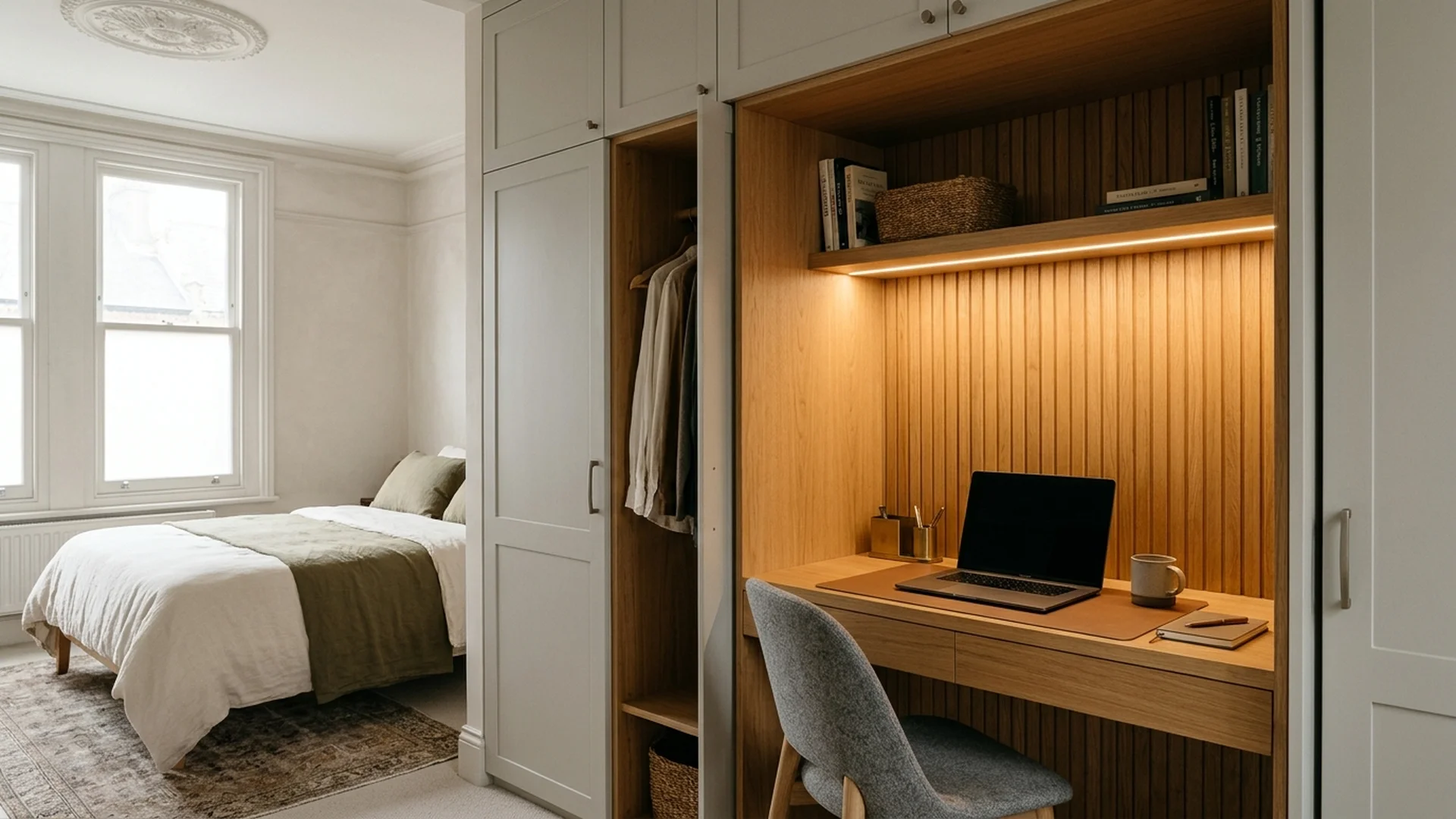
A 600mm wardrobe is not automatically a usable desk. Its doors, back panel and cable space reduce the depth available for working equipment and knees.
Start with the equipment list. Place the actual keyboard and monitor on a temporary surface, then mark where your forearms rest when seated comfortably for work. Try 620mm to 680mm overall depth as a first drawing study, not a universal ergonomic minimum. Some equipment needs considerably more space. Others need less.
Draw the open position too. A desk that closes neatly can still leave a monitor too close or put the keyboard beyond a comfortable reach during use.
Depth has a bedroom cost. Mark the walking route beside the bed before increasing the carcass size. A larger work surface should not block normal movement.
Choosing pocket door hardware over hinged wardrobe doors
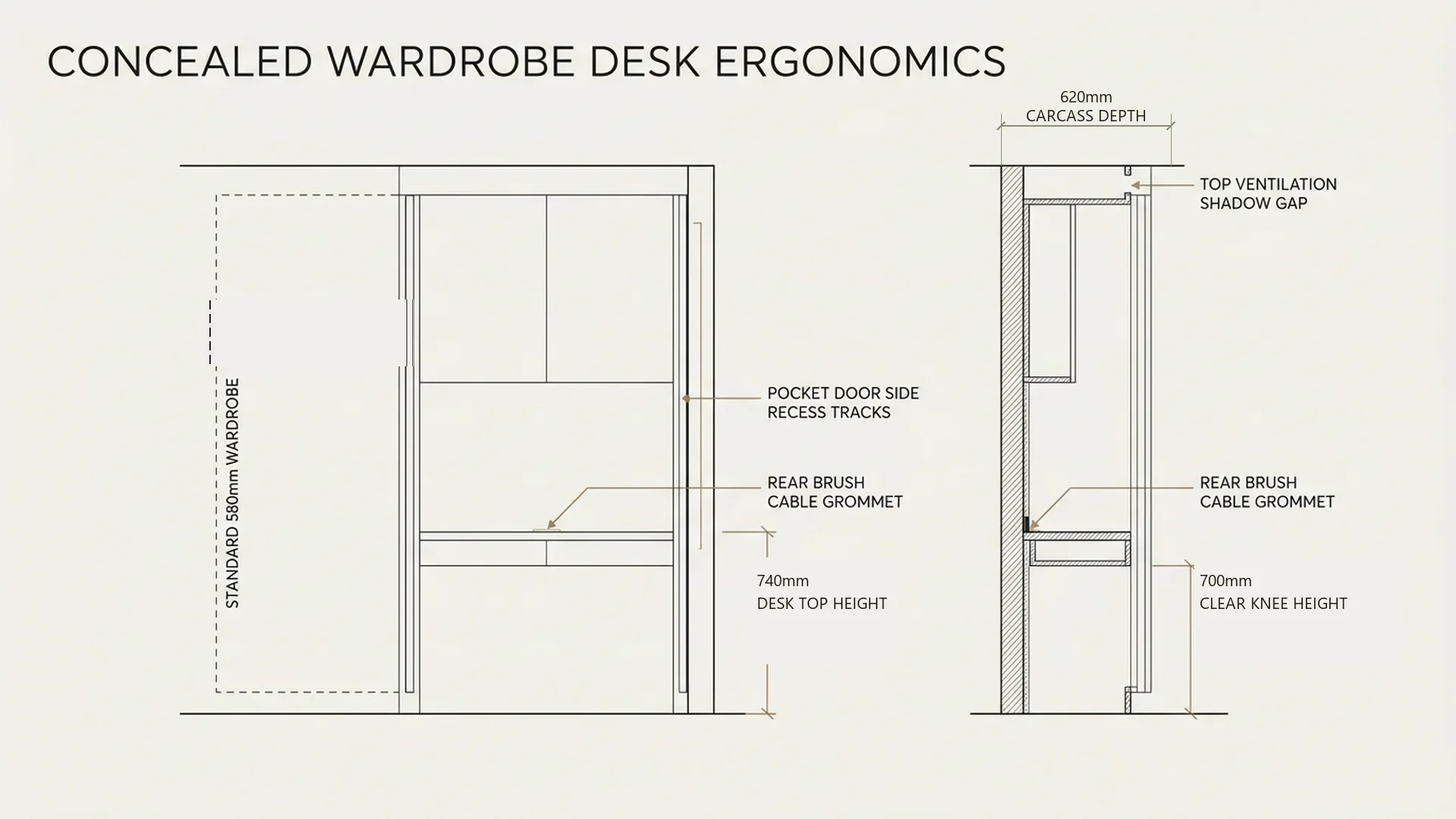
Door pockets take usable width. A preliminary 55mm to 65mm side allowance can help test the layout, but the actual mechanism determines its required dimensions.
Check the complete hardware plan. Hawa Concepta systems have model-specific door sizes and weight limits, so select the exact version before finalising the opening or ordering fronts. A bi-fold option saves pocket width. Its folded leaves still project into the room, so draw that stack beside the seated user and the bedroom circulation route.
Do not dismiss an open alcove. It keeps equipment accessible and avoids moving hardware, although work remains visible from the bed after the day has ended.
Operate a suitable sample if available. Ask the studio what can be demonstrated before visiting, rather than assuming every proposed pocket system is installed in the showroom.
Seating clearances, cable paths and thermal ventilation
Set the chair before the desktop. A 730mm to 750mm height is a planning starting point, not a British rule that suits every person or working position.
Check the arms and backrest. Draw the chair at its actual adjusted height, including castors and armrests, to see whether it really fits inside the closed bay. Keep knee space clear underneath. Drawer boxes and cable trays need their own depth, otherwise the apparent desktop height can conceal an uncomfortable obstruction below its front edge.
Allow movement behind the seat. The HSE workstation checklist asks about equipment reach, posture and space to change position. A cupboard dimension alone cannot establish comfort.
Keep powered equipment ventilated during use. Follow each device manufacturer's instructions, and do not close doors around working laptops or charging equipment without an assessed arrangement.
Lighting needs a screen check. Warm 2700K to 3000K LEDs can suit the bedroom, but colour temperature alone does not determine glare or adequate task illumination.
Comparing concealed desk specifications against standard wardrobes
Choose the daily behaviour first. A desk used for occasional paperwork has different storage and seating demands from a screen-based workstation occupied throughout the working day.
Set a clear closing routine. Decide where the chair goes, which chargers are unplugged and how loose cables are kept away from moving door hardware.
Pocket Door Framing & Structural Carcass Engineering
- Hawa Concepta selection: Use the selected Hawa configuration and installation plans. The Concepta III 25 Pull example lists 18mm to 26mm doors; permissible weight varies with dimensions. Do not transfer its limits to every system.
- Pocket allowance: Treat 55mm to 65mm as an initial layout allowance only. Confirm the actual pocket, door projection, internal cheeks and adjustment access before manufacture.
- Desktop span: A 25mm to 30mm top is a starting specification, not an anti-sag guarantee. Check material stiffness, unsupported span and equipment loads; add brackets or reinforcement where designed.
- Front stability: Tall doors may need straightening fittings under the chosen hardware instructions. Seasonal movement remains possible. Record acceptable movement and adjustment access with the maker.
Cable Routing, Power Distribution & Passive Heat Dissipation
- Electrical design: Have a competent electrician design any fixed wiring to the applicable BS 7671 requirements. A recessed brass grommet is cable protection, not electrical certification or a ventilation calculation.
- Charger tray: Provide a ventilated, accessible tray appropriate to the equipment instructions. Do not cover adapters, overload sockets or trap leads in moving pockets. Unplug chargers after use.
- Lighting controls: A door switch may control 2700K to 3000K LEDs where suitable. It does not automatically isolate every socket or remove residual heat from equipment.
- Inspection access: Keep drivers, connectors and protective cable edges accessible for inspection. Check lighting reflections on the screen before approving the shelf position.
Preparing your bedroom joinery brief
Bring a measured room plan. Include the bed and door swings, then add the chair dimensions and an equipment list with charger locations beside each device.
Check the closed elevation at eye level. The desk fronts can follow adjoining wardrobe proportions without disguising the pocket space needed for dependable access and adjustment.
Compare seated storage arrangements with fitted wardrobes and dressing tables before selecting the internal layout.
Browse the Residential Lookbook for broader room ideas, not a promise of a particular installed desk.
Arrange a tailored bedroom joinery consultation with your floor plan and chair dimensions.
Use the to assess posture and screen glare.
Check the Hawa Concepta planning tool for the selected mechanism.
Follow Electrical Safety First home-office guidance when planning charging and cable storage.
Review the fitted wardrobe service scope before commissioning a bedroom workstation.
Planning a kitchen too? The kitchen cost calculator covers indicative kitchen cabinetry, not a wardrobe desk estimate.
Frequently Asked Questions
What is the minimum wardrobe depth needed for a hidden desk?
Test the equipment rather than ordering a universal minimum. A 620mm to 680mm overall study may be useful. Confirm clear desktop depth after pockets, backs and cables are drawn.
Can I store my office chair inside the wardrobe?
Only if its measured envelope fits. Check armrests at the working height and leave room for cables. Never substitute an unsuitable stool simply to close the doors.
Will my laptop overheat inside a closed wardrobe desk?
Do not assume passive gaps prevent overheating. Follow the device instructions and keep doors open during operation unless a competent assessment establishes otherwise. Unplug chargers before storing equipment.
Which pocket door system is most reliable for daily use?
Select a system rated for the actual front. Door size, weight and installation quality matter more than a brand name alone. Confirm adjustment and maintenance access.
What lighting works best inside a wardrobe workstation?
Provide controllable task lighting without screen reflections. A 2700K to 3000K source can suit bedroom ambience, but test the actual light level and position with the equipment.
Can a hidden desk wardrobe be fitted into Victorian alcoves?
Often, after survey and layout checks. Keep ventilation and service access clear, and plan scribes around the existing walls. The usable opening must still accommodate a suitable chair.
London Bespoke Inspiration
Explore contemporary palettes, storage mechanisms, and architectural joinery.